How to Compress a PDF for Email (We Tested Every Setting)
On this page
To send a PDF by email, get it under your provider's limit: 25 MB for Gmail, 20 MB for Outlook.com and iCloud Mail, and often 10 MB for work email on Microsoft Exchange. The quickest way is to run it through a PDF compressor on a medium setting. In our tests, medium shrank a 3.2 MB scanned document by 79% and kept the text sharp. The lowest setting made the file far smaller still, but turned scanned text visibly blurry.
Below are the exact limits, our test results, and step-by-step instructions.
What is the maximum PDF size you can email?
It depends on the email service. These are the published limits as of October 2026:
| Email service | Attachment / message limit | What happens above it |
|---|---|---|
| Gmail (personal account) | 25 MB | Gmail swaps the file for a Google Drive link |
| Outlook.com | 20 MB (attachment and message together) | You'll be asked to share via OneDrive instead |
| Microsoft Exchange (work email) | 10 MB by default; your IT admin can change it | Outlook won't let you send it |
| iCloud Mail | 20 MB per message | Up to 5 GB if Mail Drop is turned on |
Two things trip people up. First, the limit usually covers the whole message, not just the file, and attachments grow in size when they're encoded for sending. A 19.5 MB PDF can still bounce from a 20 MB limit. Second, the recipient's limit matters too. If you're emailing a company, assume 10 MB to be safe.
Rule of thumb: aim for under 10 MB and your PDF will get through almost anywhere.
Which compression setting should you choose?
We ran three real documents through the ZestyPDF compressor at each of its three settings. Here's what came out:
| Document | Original | Low | Medium | High |
|---|---|---|---|---|
| Scanned notes, 5 pages, 300 dpi color scan | 3.21 MB | 233 KB (−93%) | 669 KB (−79%) | 3.21 MB (no saving; original returned) |
| Slide deck exported to PDF, 8 slides | 1.58 MB | 100 KB (−94%) | 100 KB (−94%) | 127 KB (−92%) |
| Text document saved from Word, 5 pages | 157 KB | 90 KB (−43%) | 103 KB (−34%) | 106 KB (−32%) |
What the numbers tell you:
- Scanned documents shrink the most. A scan is really a stack of large photos, and photos are where almost all the file size lives.
- Text-only PDFs save only tens of kilobytes. There's little to remove, and they're usually small enough to email already.
- Low isn't always worth it. On the slide deck, Low and Medium produced the same size file. On the scan, Low saved another 436 KB, but at a visible cost.
What does "low quality" actually look like?
The difference comes from image resolution. Our Low setting reduces images to 72 dpi, Medium to 150 dpi, and High to 300 dpi. (We checked this by inspecting the images inside each output file.) On a scanned page that means:
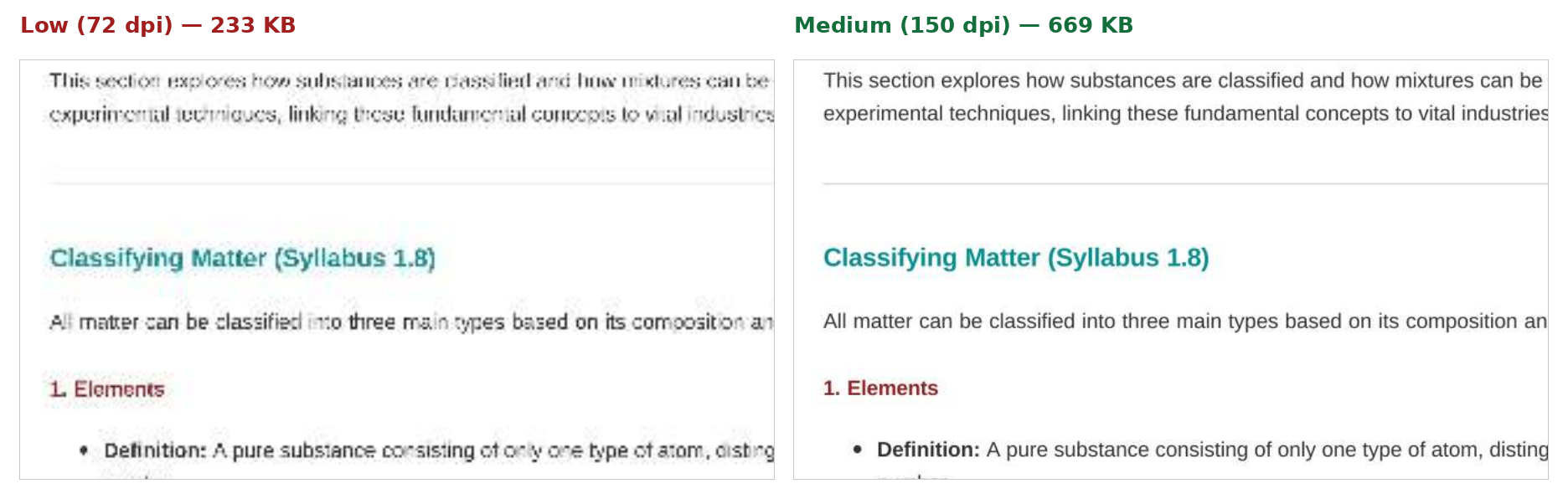
Left: Low (72 dpi). Right: Medium (150 dpi). Same paragraph, same zoom.
Low is still readable on screen, but small print gets fuzzy and it prints poorly. For anything someone needs to read, sign or print, use Medium. Save Low for documents that are only being skimmed, or for when Medium still doesn't get you under the limit.
Why didn't "High" make the scan smaller?
High keeps images at 300 dpi. Our test scan was already 300 dpi, so there was nothing to remove. When that happens, the tool gives you back your original file and tells you it's already well optimized, rather than a copy that's no smaller. If you see that message, switch to Medium.
How to compress a PDF for email, step by step
- Open the Compress PDF tool in any browser. It works on Windows, Mac, iPhone and Android, with no sign-up.
- Drop your PDF in, or click to choose it. Files up to 100 MB are accepted.
- Choose Medium.
- Click Compress and wait a moment. Our test files took 0.1 to 1.5 seconds to process on the server, plus upload time.
- Check the new size shown on screen. If it's still over your limit, run it again on Low.
- Download the file and open it once before you send it. Zoom in on the smallest text to make sure it's readable.
About privacy: compression runs on our server, using the open-source tool Ghostscript. Your file is sent over an encrypted connection, and the uploaded and compressed copies are deleted from the server when the job finishes.
What if the PDF is still too big?
If Medium and Low both leave you over the limit, you have three honest options:
- Split it. Send it in two or three emails using Split PDF. For example, send the main document in one email and the appendices in another.
- Send a link instead. Upload it to Google Drive, OneDrive, Dropbox or iCloud and email the link. Gmail does this automatically for large files, and Outlook offers to share through OneDrive.
- Re-scan at a lower resolution. If you're scanning paper, 150–200 dpi is plenty for most documents. A 600 dpi scan is huge and gains you nothing on screen.
Can you compress a PDF without an online tool?
Yes, if you have the right software already:
- Mac: open the PDF in Preview, choose File → Export, and set Quartz Filter to Reduce File Size. This is very aggressive, so check that the text is still legible.
- Microsoft Word on Windows: if you're creating the PDF from a Word document, choose File → Save As → PDF, and under Optimize for pick Minimum size (publishing online). This only helps when you're making the PDF, not for a PDF you've received.
- Adobe Acrobat (paid): offers a "Reduce File Size" option with more control over each setting.
These work well. An online compressor is simply quicker when you're on a phone or a computer that doesn't have them.
How we tested
We compressed three files with ZestyPDF's live compression service on October 21, 2026:
- a 5-page set of chemistry study notes saved from Word (text and headings);
- the same notes rendered as a 300 dpi color scan (images only, like a document from a scanner app);
- an 8-slide presentation exported to PDF.
We recorded the sizes reported by the service. We confirmed the image resolution inside each output with pdfimages, and compared pages side by side at the same zoom. The email limits come from Google, Microsoft and Apple's own help pages, linked below.
Written and tested by the ZestyPDF editorial team. Drafted with AI assistance; every test, figure and step was run and checked by a person before publishing.