How to Turn Phone Photos Into One PDF Under 500 KB (We Tested 1 MB Down to 100 KB)
On this page
- How do I combine phone photos into one PDF under 500 KB?
- How small can the PDF be before the text becomes unreadable?
- Why are phone photos so big in a PDF?
- Why did one of my photos get much smaller than the others?
- Will a sideways photo come out sideways in the PDF?
- Can I use my phone's own scanner instead?
- How we tested
Add your photos to a JPG-to-PDF tool that has a size limit, set the limit to 500 KB, and check the result by zooming in before you upload it. In our test, four 12-megapixel phone-style photos (5.1 MB together) became one 4-page PDF of 400 KB in about 5 seconds on our test machine, and even 6-point print stayed sharp when we zoomed in. You can go smaller, but the text pays for it: at 200 KB the small print was still readable, and at 100 KB it started to break up. From our results: allow at least 50 KB per page if the page has small print. That kept 6-point text readable but soft; about 100 KB per page kept it sharp.
Below: the steps, what happens at each size limit, and why some photos are harder to shrink than others.
How do I combine phone photos into one PDF under 500 KB?
- Take the photos in good light, one page per photo, with the page filling most of the frame.
- Open JPG to PDF on your phone or computer and add the photos. You can add up to 50, at up to 25 MB each.
- Drag them into the right order. Each photo becomes one page.
- Turn on "Keep the PDF under a size limit" and tap 500 KB. The other choices are 200 KB, 300 KB, 700 KB, 1 MB and 2 MB, or you can type your own limit.
- Tap "JPG to PDF" and download the file.
- Open the PDF and zoom in on the smallest text, such as a reference number or an address, before you upload it.
The photos are processed in your browser, so they aren't uploaded to our server. The size is set to pass forms that count 1 KB as either 1,000 or 1,024 bytes.
How small can the PDF be before the text becomes unreadable?
It depends mostly on how much room each page gets. The size limit is shared across the pages, so four pages at 200 KB look about the same as two pages at 100 KB. These are our results for the same four photos, plus two of them on their own:
| Size limit | Photos | PDF size | Page 1 kept at | Small print (6 to 7 pt), zoomed in |
|---|---|---|---|---|
| No limit | 4 | 5.13 MB | 3000 × 4000 px | Sharp |
| 1 MB | 4 | 918 KB | 3000 × 4000 px | Sharp |
| 500 KB | 4 | 400 KB | 1566 × 2088 px | Sharp |
| 200 KB | 4 | 190 KB | 962 × 1282 px | Readable; 6 pt soft |
| 100 KB | 4 | 95.5 KB | 695 × 926 px | 7 pt hard to read, 6 pt breaking up |
| 200 KB | 2 | 164 KB | 1331 × 1775 px | Sharp |
| 100 KB | 2 | 95.8 KB | 962 × 1282 px | Readable; 6 pt soft |
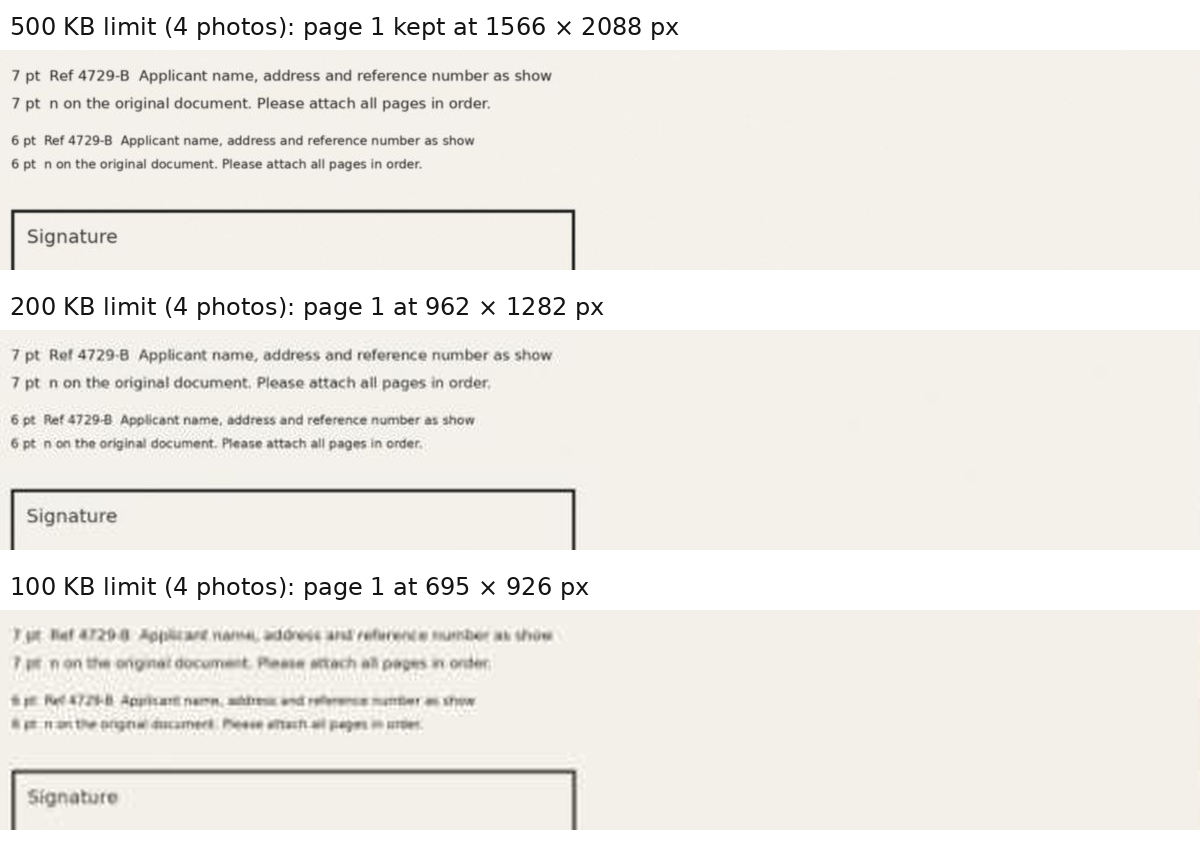
At the 100 KB limit with four photos, the tool also showed a warning: "Some pages had to be reduced a lot. Zoom in and check the text is readable before you upload." If you see that message, check the PDF carefully, and if the form allows it, use a bigger limit or fewer pages. At 100 KB, the reference "Ref 4729-B" on our test page started to look like "4729-8", so letters and digits are the first thing to check.
Why are phone photos so big in a PDF?
A phone photo holds millions of pixels: our test photos had 12 million each, and together the four were 5.1 MB. Without a size limit, this tool puts JPG photos into the PDF unchanged, so the PDF is about as big as the photos added together: our four photos came to about 5.1 MB, and so did the PDF. To get under 500 KB, the tool has to make each photo smaller. It lowers the JPEG quality and the number of pixels until the file fits, and it never goes below 800 px on a page's long side, which the tool treats as the smallest size where document text stays readable.
Why did one of my photos get much smaller than the others?
Because it was harder to compress. In our test, the photo we made to look like it was taken in dim light (darker, with added grain) was nearly twice the size of the others before conversion, because grain takes up more bytes. At the 1 MB limit, the three brighter photos kept their full 3000 × 4000 px, while the dim one was reduced to 1842 × 2456 px. At 500 KB it was again the smallest page. Two things help:
- Use good light. A brighter photo has less grain, so more of the size limit goes on the text.
- Fill the frame with the page. Background around the page also takes up some of the size limit.
Will a sideways photo come out sideways in the PDF?
It shouldn't. Phones often save a photo sideways and add a note saying which way is up. Our test included a photo saved that way, and it came out upright in every PDF, with and without a size limit. Still check every page before you upload.
Can I use my phone's own scanner instead?
Yes. Both of these let you crop the photo to the page, which leaves less background to store:
- iPhone: in the Notes app, tap the Attachment button, then Scan Documents (Apple Support).
- Android: in the Google Drive app, tap Camera, scan the pages, choose .pdf as the format and save (Google Drive Help).
If the scanned PDF is still too big for the form, compress it with Compress PDF to 500 KB.
How we tested
- Date and tool: 27 October 2026, on the live JPG to PDF page, with A4 pages, run in Chromium.
- Photos: four simulated phone photos, generated for the test: 12 megapixels each, 5.1 MB in total, of a printed page with lines of text from 12 pt down to 6 pt. One was saved sideways with the "which way is up" note phones use, and one was made darker and grainier, as a photo in dim light would be.
- What we recorded: the PDF size, the pixel size of each page inside the PDF, and whether the 6 and 7 pt lines were readable when zoomed in (we compared enlarged crops of the same lines at each limit). Point sizes are for the printed sheet in the photo.
- Times: about 4.4 to 5.4 seconds for four photos with a limit, on our test machine. Your phone may be faster or slower.
Our test images were cleaner than most real phone photos, which usually have more grain and detail. Real photos may need a bigger limit than our table shows, so treat it as a guide and always zoom in and check your own PDF.
Related guides
- How to Compress a PDF for Email (We Tested Every Setting)October 21, 2026